EMS & Power Analytics
Monitor complete energy flows, analyse individual meters and meter groups, diagnose power quality, generate consumption and cost reports, export to Excel, and build location-based Scope 2 carbon visibility from one platform.
Visualise grid supply, consumption, generation and the complete meter hierarchy.
Analyse individual meters, net meters, consumer meters and configured meter groups.
Move from overall power metrics to detailed three-phase and engineering diagnostics.
Generate energy reports, cost breakdowns, Excel exports and Scope 2 carbon outputs.
See the complete energy flow
The EMS visualises how energy moves from grid or net meters through downstream consumer meters, areas and meter groups — while preserving the hierarchy behind every value.
From supply to individual consumers.
The overview combines current power and accumulated energy with the configured meter hierarchy. Net-meter distribution, consumer-meter consumption and meter-group totals can be viewed as part of the same model.
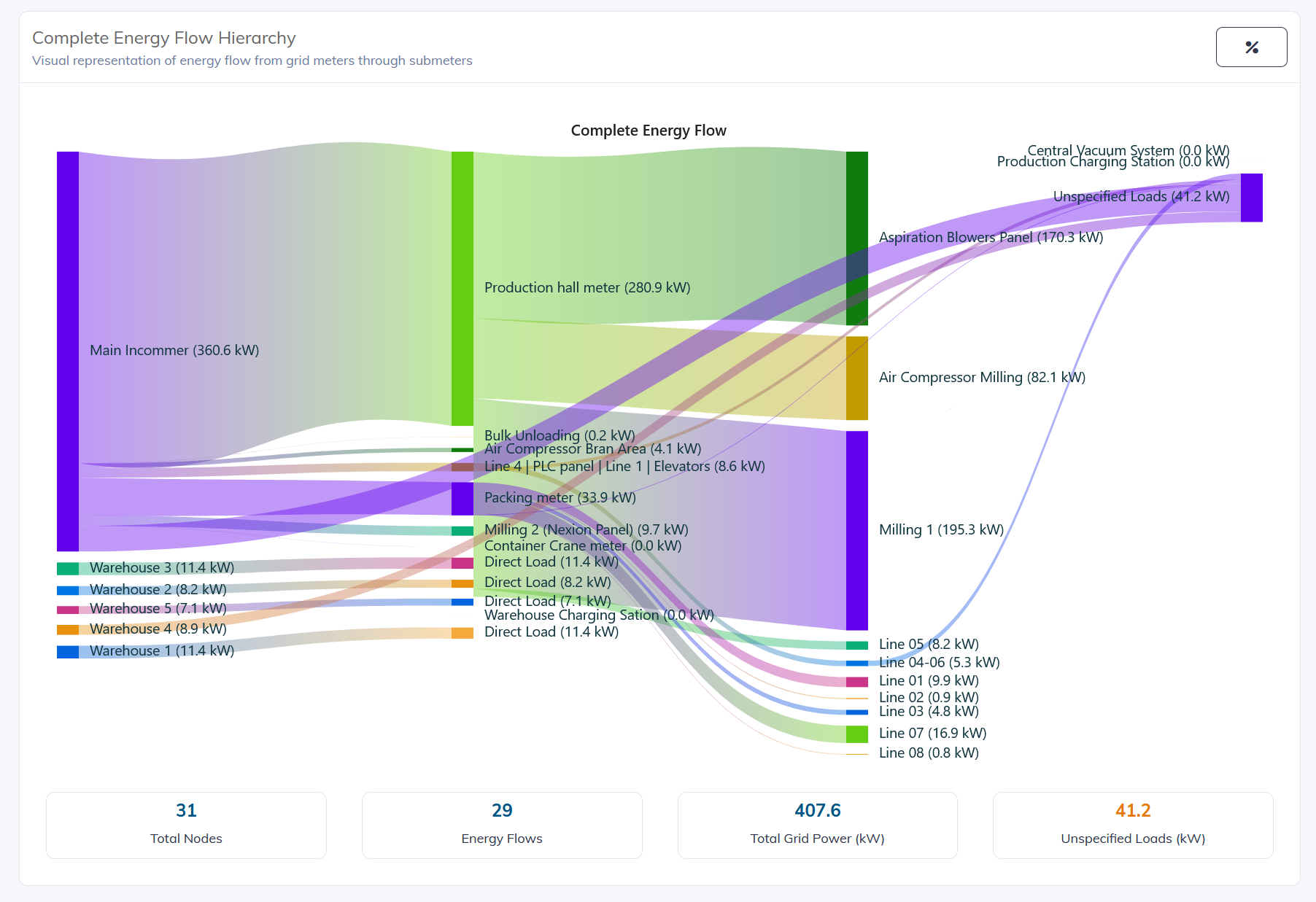
Real platform example showing the complete energy flow hierarchy from grid meters through meter groups and downstream consumers.
From overview to engineering diagnostics
Select an individual meter and move through three analysis levels: overall power health, detailed three-phase behaviour, and advanced engineering diagnostics.
System health at a glance
View real-time active power, system power factor, current imbalance, power distribution and consumption trends for the selected meter.
Detailed three-phase analysis
Inspect three-phase power-quality behaviour and phase-level electrical characteristics for deeper technical investigation.
Advanced diagnostics
Analyse the power triangle, harmonic spectrum, power-quality events and engineering recommendations for the selected meter.
Understand the health of each electrical point
Instead of stopping at kWh totals, the platform can expose electrical behaviour that helps engineering teams investigate losses, imbalance, power-factor issues and power-quality conditions.
Report by meter, group and hierarchy
Generate structured energy reports using the configured meter hierarchy and grouping. Consumption, tariff periods, shifts and costs can be presented together and exported for further analysis.
Generate views for a selected meter and its measured consumption.
Aggregate configured meters into logical operational or category groups.
Separate energy by configured tariff periods and operating shifts.
Export generated report data for finance, engineering or further analysis.
Connect energy to production
Energy data lives in the same Industrial Intelligence Platform as runtime, machine and production data. This makes it possible to view consumption together with the operational context behind it.
One asset, one data structure, multiple operational perspectives.
Turn grid-meter data into carbon visibility
Carbon reporting uses net-meter electricity data and location context. The platform supports Scope 2 electricity reporting with country-specific emission-factor handling and exportable reporting packages.
Prepare electricity-emissions data, methodology and verification information for sustainability reporting workflows.
Generate CSRD-oriented outputs, EU ETS-oriented exports, verification packages and raw-data exports where configured.
Scope 1 and Scope 3 require additional external data beyond the electricity information handled by the EMS.
Operations, engineering, reporting and sustainability
Energy operations
Understand current supply, consumption, generation and meter hierarchy.
Electrical engineering
Analyse meter-level power quality from overview through advanced diagnostics.
Cost & reporting
Generate consumption, tariff and cost reports with Excel export.
Carbon visibility
Use net-meter electricity data as the basis for location-aware Scope 2 reporting.
Go beyond basic energy monitoring.
Connect metering, power-quality analysis, reporting, cost visibility and carbon data through one industrial platform.